Whaleproof 🐋
Hide your orders from the order book until the market comes to you.
What Is a Whaleproof Order?
On a normal exchange, the moment you place a limit order it becomes visible on the public order book. Large players — the “whales” — watch that book closely. When they spot a sizeable order resting at a price, they can trade against it, push the price around it, or front-run it, so your order fills on worse terms than you intended.
Whaleproof orders solve this by keeping your order off the exchange entirely until the last moment. When you place a Whaleproof order, Raydar does not send it to the exchange. Instead, Raydar holds it privately and quietly watches the live market price. Only when the price moves to within the percentage you set — say 5% of your target price — does Raydar submit the real order to the exchange, and the trade executes.
Because the order never sits on the public book while it waits, whales scanning the order book cannot see it, cannot gauge its size, and cannot position themselves against it. You slip through their net and execute closer to the price you actually wanted.
How It Works
- You define the order and a trigger distance. For example: buy
BTC/USDTat a target price, and trigger when the market is within 5%. - Raydar holds the order. It is stored on Raydar’s side with a Waiting status — nothing is sent to the exchange yet, so it never appears on the order book.
- Raydar monitors the price continuously in the background.
- The trigger fires. As soon as the market price comes within your trigger percentage of the target, Raydar instantly submits the order to your connected exchange.
- The exchange executes it like any normal order, and it then appears in your regular Order History.
Enabling a Whaleproof Order
Whaleproof is enabled from the same Create Order screen you use for regular orders (see How to send an order). Build your order as usual — wallet, market type, side, order type, price, and quantity — then turn on Whaleproof and set its extra fields:
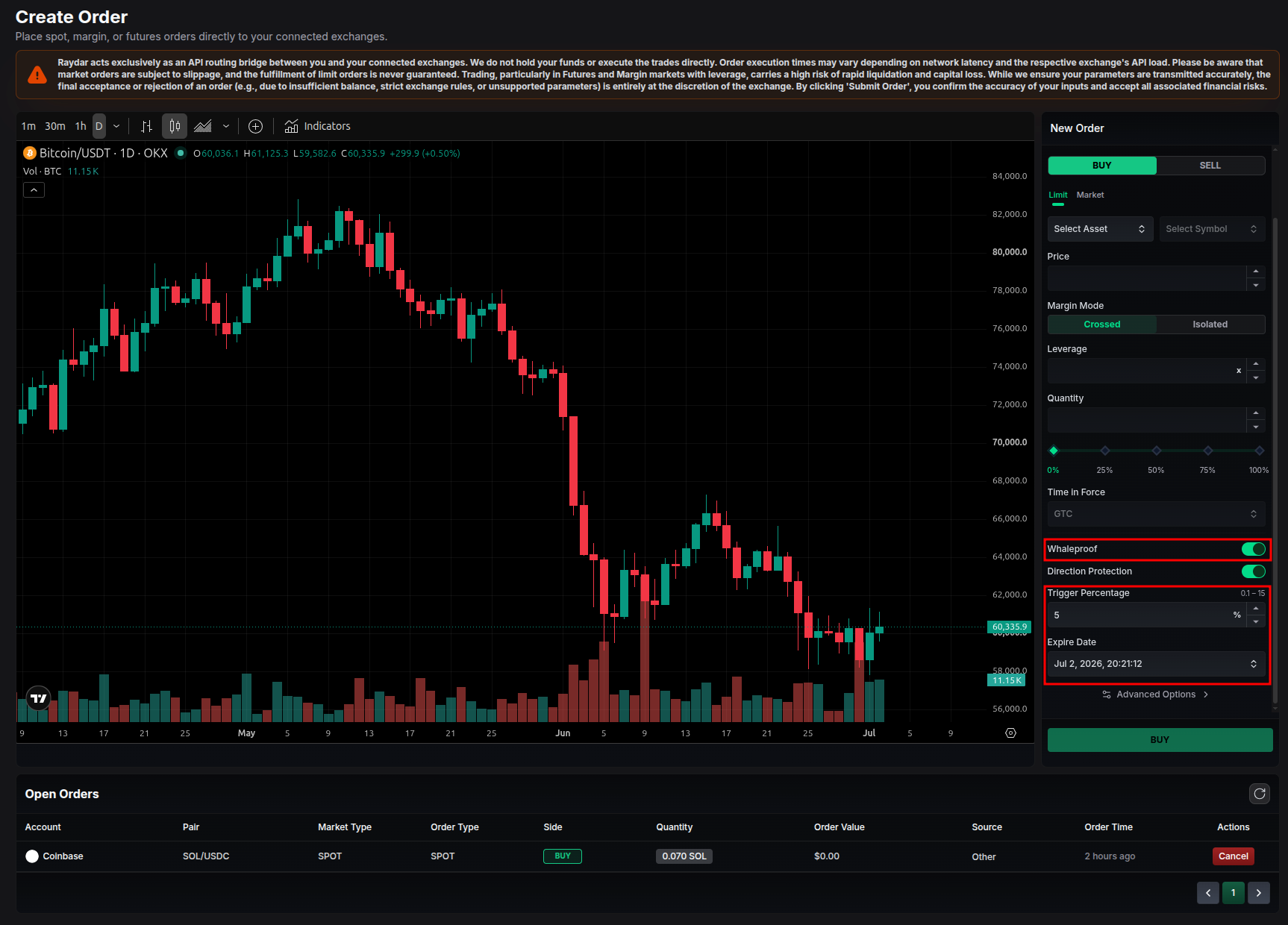
- Whaleproof toggle: Switch this on to route the order through the Whaleproof flow instead of sending it straight to the exchange.
- Trigger Percentage (%): How close the market price must get to your target before the order is released. Accepts a value between 0.1% and 15%. A smaller percentage holds the order longer and releases it nearer to your exact target; a larger percentage releases it sooner.
- Expire Date: An optional deadline. If the market never reaches the trigger by this date, the order expires without being sent. Leave it empty for no expiry.
- Direction Protection: An optional safeguard (on by default) that only releases the order when the price approaches your target from the expected direction. It prevents the order from firing if the market has already shot past your target the wrong way. Turn it off to trigger purely on proximity, regardless of which side the price approaches from.
Whaleproof works with every market type — Spot, Margin, Isolated Margin, USDⓈ-M Futures, and COIN-M Futures. The full order (including leverage and margin settings for futures) is stored exactly as you configured it and replayed to the exchange when the trigger fires.
Viewing & Managing Whaleproof Orders
Open the Whale-Proof Orders page from the left sidebar to see all of your Whaleproof orders and their current state.
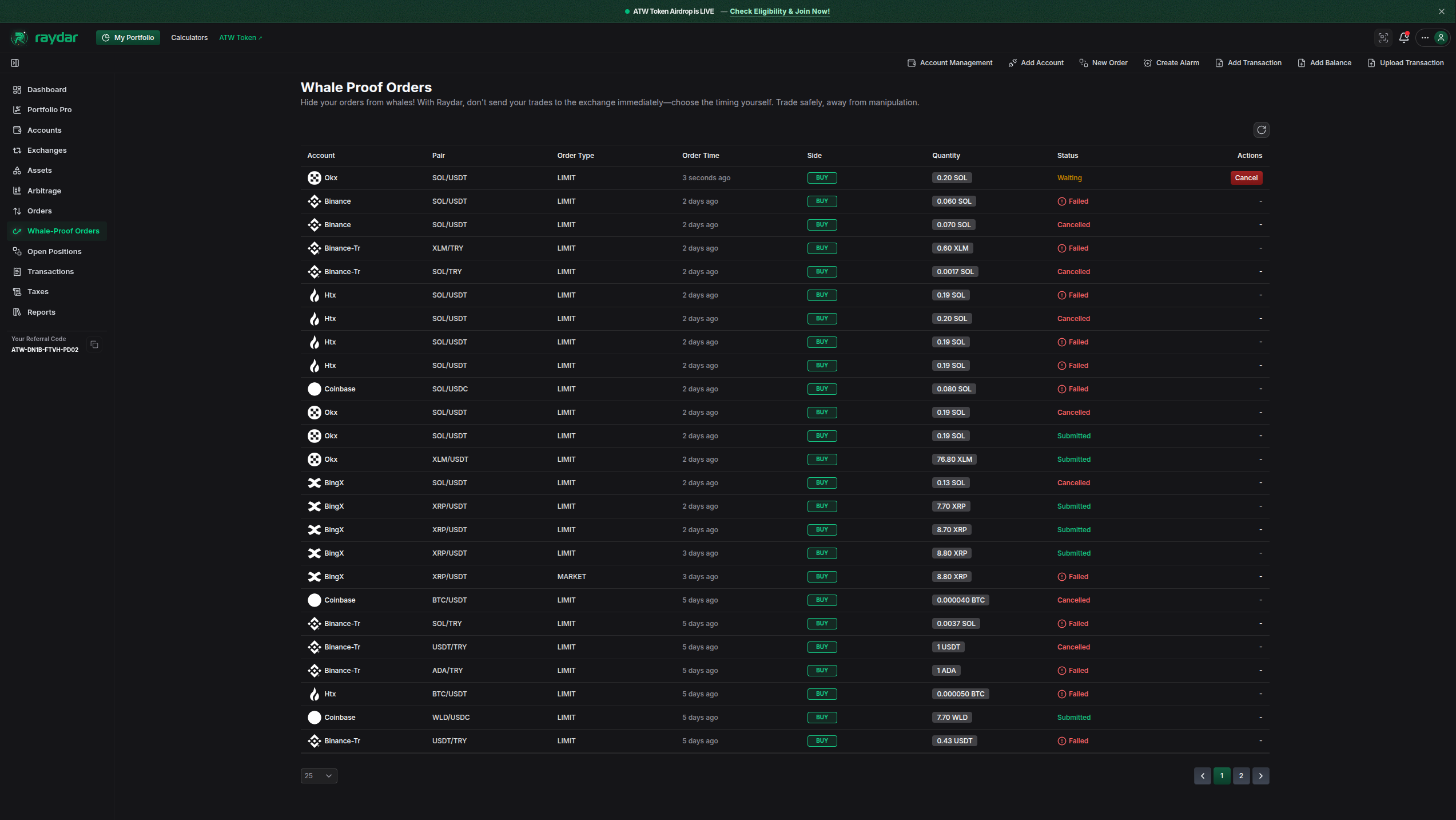
Each row shows the wallet and pair, side, order type, your target price, quantity, the trigger percentage, the expiry date, and the current status:
- Waiting: The order is being held and monitored. It has not been sent to the exchange yet.
- Submitted: The trigger fired and the order was successfully placed on the exchange. You can then track it in your regular Order History list.
- Cancelled: You cancelled the order while it was still waiting.
- Expired: The expiry date passed before the price reached the trigger.
- Failed: The order could not be placed on the exchange. The reason (for example, insufficient balance or an exchange rule) is shown so you can understand what went wrong.
Cancelling: While an order is still in the Waiting state, you can cancel it directly from this page. Once an order has been Submitted, Expired, or Failed, it can no longer be cancelled here — a submitted order lives on the exchange and is managed like any other open order.